
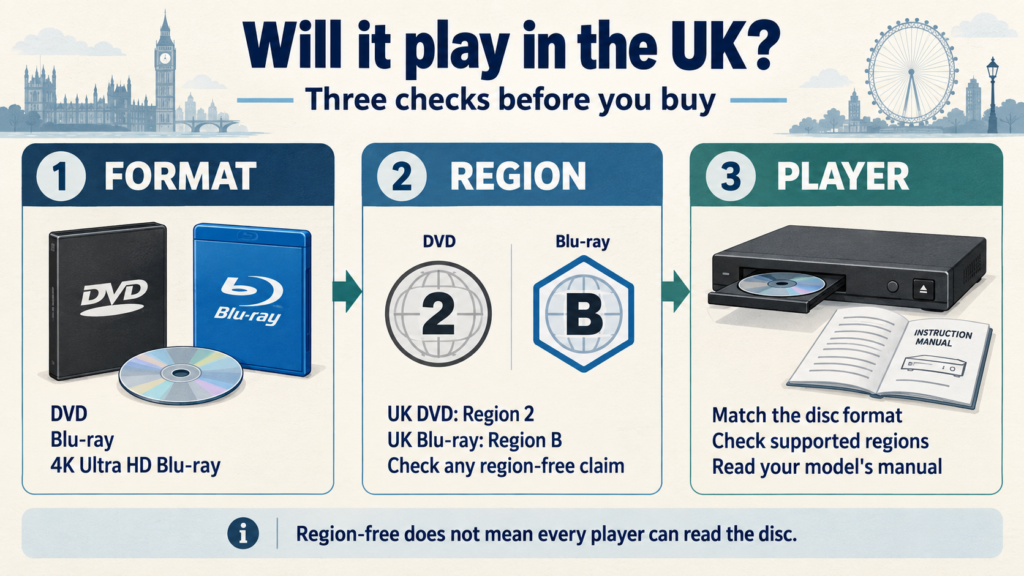
Before buying a DVD or Blu-ray, check three things: the disc format, its region code and your player’s specifications. UK equipment normally uses DVD Region 2 and Blu-ray Region B, but imported players and individual disc editions can differ.
“Region-free” addresses regional restrictions. It does not mean a disc will work in every type of player. A region-free Blu-ray still needs Blu-ray playback equipment.
This guide explains how to read the details and what to ask when a listing leaves something unclear.
Start with the format: DVD, Blu-ray or 4K Ultra HD Blu-ray
Read the format stated on the product page and packaging. Do not choose an edition from its film title or cover artwork alone.
A standard DVD player cannot read Blu-ray discs. A Blu-ray player generally supports DVDs as well, subject to the disc’s compatibility requirements. A 4K Ultra HD Blu-ray disc needs a player that specifically supports that format; an ordinary Blu-ray player is not sufficient. The BFI’s format guide explains these differences.
When comparing editions, make a short note of the exact format you want. This is especially useful when the same film appears in several listings or a box set includes more than one disc format.
Which DVD and Blu-ray regions does the UK use?
DVD regions use numbers, while Blu-ray regions use letters. The usual UK pairing is:
| Disc type | Usual UK region | What to look for |
|---|---|---|
| DVD | Region 2 | A region marking that includes 2, or a confirmed all-region edition |
| Blu-ray | Region B | A region marking that includes B, or a confirmed region-free edition |
The BFI’s region-code reference identifies these UK regions.
Some discs support more than one region. Read the full marking, rather than treating every imported edition as incompatible. Equally, a price in pounds or a UK delivery option does not establish a disc’s region.
Check the actual player too, particularly if it was bought overseas or second-hand. Its model number and manual are more useful than the country where you now use it.
What do Region Free, All Regions and ABC mean?
For DVDs, “Region 0” and “All Regions” are commonly used descriptions for discs without a regional playback restriction.
For Blu-rays, an A/B/C marking indicates support for all three Blu-ray regions. Sony explains that region-free Blu-ray discs either have no regional restriction flag set or have all three flags enabled. See Sony’s Blu-ray region guide.
These descriptions do not tell you the subtitle languages, included extras or packaging. Check those separately.
If a listing says “Region Free / All Regions”, confirm that the information applies to the exact edition and format you intend to buy. If the packaging and written description disagree, ask for clarification before ordering.
Check the player’s format and region support separately
Look up the complete model number on the manufacturer’s support website. In the manual, find the sections covering playable discs, region codes and supported video systems.
If equipment is advertised as “multi-region”, check whether that description covers DVD playback, Blu-ray playback or both. Do not assume a statement about one format also applies to the other.
For imported DVDs, PAL and NTSC are another detail to check. Video-system support is separate from region coding: Sony’s DVD compatibility guidance discusses both. Use the specifications for your exact player and connected display when checking an imported disc.
For a game console or computer drive, follow the same process: identify the exact hardware and check its supported movie-disc formats and regional restrictions.
What about 4K Ultra HD Blu-ray and mixed-format sets?
Sony describes Ultra HD Blu-ray discs as region-free, but they still require compatible Ultra HD Blu-ray playback equipment.
A package may also contain a standard Blu-ray or DVD. Check each included format separately; the UHD disc’s region status does not establish the region status of a companion disc. A 4K television also does not establish whether your disc player can read UHD media.
When browsing TV series box sets, record the format and included seasons alongside the compatibility details. That helps keep two separate questions clear: “Can I play this edition?” and “Does it contain the episodes I want?”
A practical check before adding a title to your basket
Use this sequence for each unfamiliar edition:
- Record the exact product. Save the product link and note the format, film or season range, and any edition details.
- Find the region information. Read the specification table and any legible packaging images.
- Identify your equipment. Note the player’s full model number and where it was purchased.
- Compare the requirements. Check supported formats and regions in the manual, plus video-system support where relevant.
- Resolve missing information. Ask about any absent or contradictory details before paying.
For a larger purchase, keep these notes beside your title list. Our guide to buying DVDs and Blu-rays in bulk explains how to organise editions, quantities and mixed-title enquiries.
Avoid copying compatibility information from another release of the same film. Different editions should be checked individually.
What to send us if you are unsure
A specific enquiry is easier to review than a title alone. Include:
- The product link and the format you want.
- Your player’s brand and full model number.
- The country where the player was purchased.
- The region wording or packaging detail you want clarified.
- Any essential audio or subtitle requirements.
You can copy this message:
I am interested in the edition at (product link). My player is a (brand and full model), purchased in (country). Could you confirm the listed disc format and region information for this edition? I also need (audio or subtitle language).
Send the details through our contact page. If you already have the disc and it will not play, include the exact on-screen error and your order number. A playback failure alone does not identify the cause; Sony’s disc troubleshooting guidance includes checks beyond region coding.
For delivery, ordering and after-sales questions, see our customer FAQs.
Choose the edition that fits your equipment
Keep a note of your player’s supported formats and regions so you can refer to it when comparing future purchases. Recheck the disc details whenever the edition changes, even if you already own another release of the same title.
Browse our DVD and Blu-ray catalogue and use the product specifications to build your shortlist. If an essential compatibility detail is missing, send the product link and player model before ordering.